
Pixel Measurement Tool for Web Developers
Overview
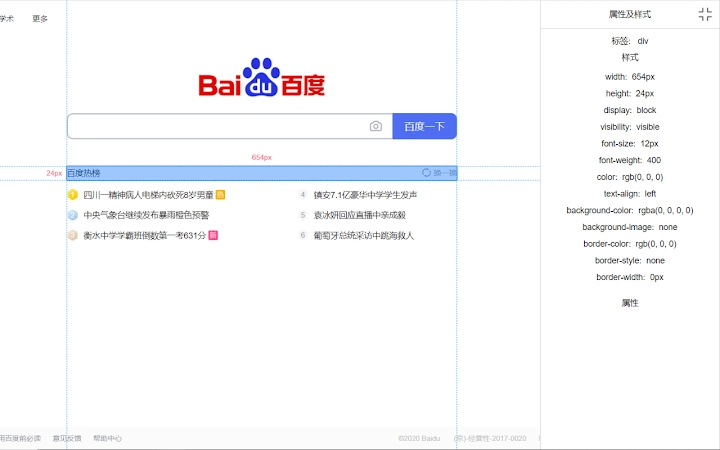
The software is designed as a developer tool for front-end professionals and web designers who require accurate pixel-level measurements within web pages. It enables users to select elements on a webpage and measure their distance from other elements in pixels, providing immediate visual feedback. The tool also displays the current element’s type and CSS properties in a right-side panel, aiding in debugging and layout analysis. It is particularly useful during responsive design testing, UI alignment verification, and style troubleshooting. The application integrates directly into the browser environment through a plugin interface, activated via a toggle button in a pop-up window. The developer did not provide additional background information. Real-world use cases include validating spacing consistency across breakpoints, inspecting element positioning, and comparing layout structures between design mockups and live implementations. The tool is intended for use in development and testing workflows where precision and speed are critical.
Key Features & Capabilities
- Pixel Measurement Between Elements – Allows users to measure the exact distance in pixels between any two elements on a web page, supporting both horizontal and vertical alignment checks.
- Real-Time CSS Property Display – Shows the current element’s type, tag name, class, ID, and active CSS rules in a right-side panel for immediate inspection.
- Toggle-Based Activation – The plugin is enabled or disabled via a switch button within a pop-up window, offering quick access without disrupting workflow.
- Element Selection and Interaction – Users can click on any element in the browser to activate measurement mode and analyze its spatial relationship with others.
- Visual Feedback for Layout Analysis – Provides clear visual indicators during measurement, helping developers identify alignment issues or inconsistent spacing.
These capabilities support efficient debugging during front-end development. For example, a developer can quickly verify whether padding and margins match design specifications. A UI designer can use the tool to validate spacing between buttons or text blocks across different screen sizes. The integration with the browser interface ensures minimal context switching, maintaining workflow continuity.
User Interface, Workflow & Performance
The user interface is minimal and focused on functionality. A pop-up window appears upon activation, housing a single switch button to enable or disable the plugin. Once active, the tool overlays measurement indicators on the webpage, allowing direct interaction with elements. Navigation is straightforward: click the switch, then select elements to measure. The right-side panel dynamically updates to reflect the selected element’s properties. The developer did not specify resource usage details. Performance observations are based on general software behavior patterns. The application is lightweight and designed for real-time responsiveness. Stability during extended use was not tested or documented. No performance degradation reports were provided. The tool operates within the browser environment, suggesting it does not consume significant system resources.
Compatibility & System Requirements
The software is compatible with Windows, Mac, and Linux operating systems. It functions as a browser extension, meaning it integrates with modern web browsers that support extension APIs. The installation size is 1.2 MB, indicating a lightweight footprint. The software version is 1.2.0, released on May 15, 2024. Exact system requirements were not listed. Compatibility information was partially provided. No specific hardware requirements were mentioned. The tool does not require high-end processing power or large memory allocation, given its size and function.
Pros and Cons
Pros
- Lightweight at only 1.2 MB in size
- Simple toggle interface for quick activation
- Provides real-time pixel measurements between elements
- Displays CSS properties directly in a right-side panel
- Designed for fast integration into development workflows
Cons
- No information on system requirements or hardware dependencies
- Developer background not disclosed
- No details on update frequency or support channels
- Performance under heavy workloads not documented
- Limited to browser-based web development tasks
FAQ Section
Is this tool compatible with all major browsers?
The software is designed to work with browsers that support extension APIs, but specific browser compatibility was not listed in the provided information.
Is the tool safe to use on sensitive or production websites?
As a front-end inspection tool, it operates within the browser environment and does not transmit data externally. No security risks were reported, but users should exercise caution when inspecting live production sites.
How often are updates released?
The last update was released on May 15, 2024. No information on future update schedules was provided.
Can I use this tool offline?
The tool functions within the browser environment and does not require an internet connection once installed, making it usable in offline development scenarios.
What type of license does this software use?
The software is available for free, with no cost associated with its use. No license details were specified beyond the free access model.
Final Thoughts + CTA
Pixel Measurement Tool for Web Developers delivers a focused, efficient solution for front-end professionals needing precise layout analysis. Its ability to measure distances between elements and display real-time CSS properties makes it a valuable asset in debugging and design validation. While limited in scope, it excels in its core functionality with a clean interface and minimal resource usage. The lack of detailed system requirements or developer information is a minor drawback, but the tool’s lightweight nature and free access make it accessible to a wide audience. Ideal for web developers, UI/UX designers, and quality assurance testers working on responsive layouts, this tool streamlines the inspection process. Download Pixel Measurement Tool for Web Developers now.







